


Creality Pika Phone Mount: Scan One-Handed and Watch It Live on Your Phone

If you own a Creality Pika, you'll know the juggle: scanner in one hand, phone in the other, trying to keep an eye on the live preview while moving around the object. The Creality Pika Magnetic Phone Mount fixes that by putting your scanner and your phone on one handle, so you can scan one-handed and watch the scan build up live on your screen.

Why the Creality Pika needs a phone mount
The Pika is a brilliant handheld 3D scanner, but the Pika app runs on your phone, and that's where you check tracking, coverage and the live point cloud. Holding both separately means one hand is always busy with the phone, the other is trying to keep the scanner steady, and you keep looking away from the object to check progress.
I design and scan parts for FiveLeaves3D with my own Pika, and that juggling act is exactly why I made this mount. With the phone sat right behind the scanner, the preview is always in your line of sight, and you've got a hand free to turn the part, move a light or steady the object.

How the Pika magnetic mount works
The mount sits between your Pika and its tripod or handle. It has brass 1/4" threads on both ends, so the tripod screws into the bottom and the Pika screws onto the top using the included camera screw. Your phone then snaps onto the magnetic face on the back.
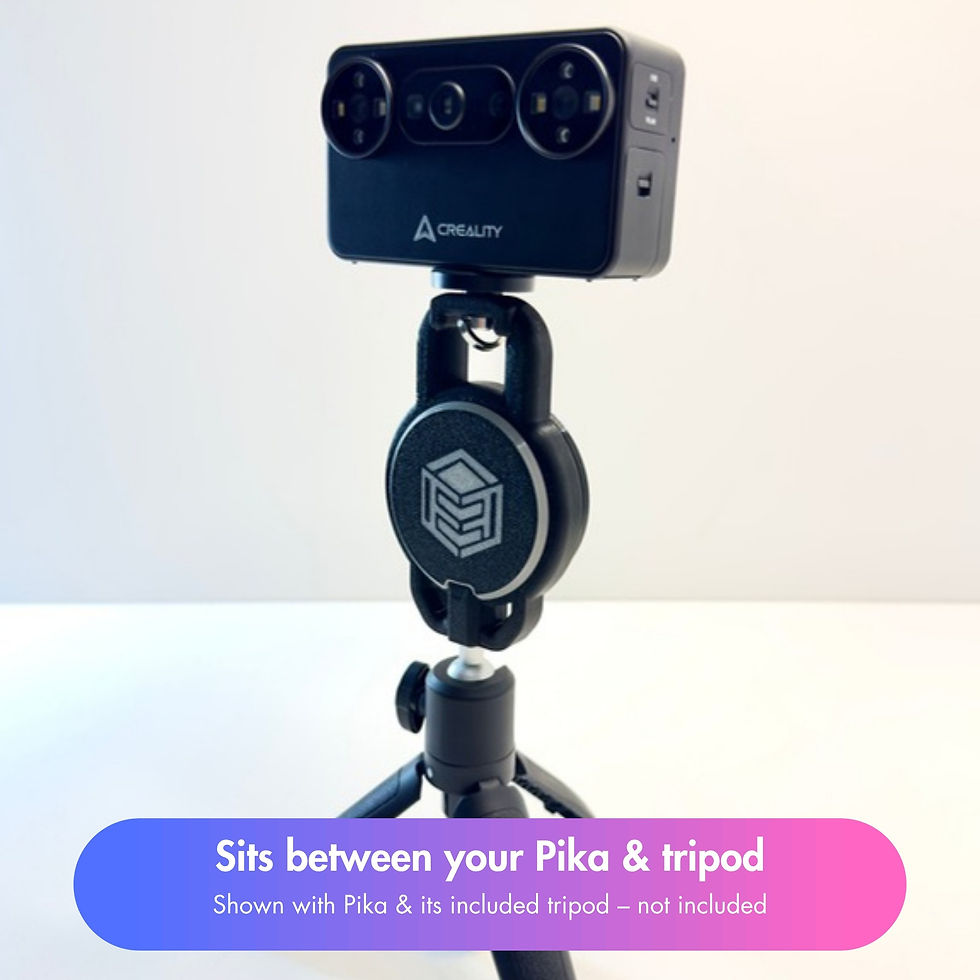
Key features
Strong N52 magnet: a MagSafe-compatible hold, so your phone stays put mid-scan.
Adjustable angle: rotate the phone with a firm push to fine-tune the angle, and it stays where you set it while you scan.
Grippy, protective front: a TPU cover over the magnet with a silicone centre grip.
Tough build: PETG body with the cover bonded in place. Nothing to assemble and nothing to come loose.
Fits any tripod: brass 1/4" threads on the top and bottom work with the tripod included with your Pika or any standard tripod or handle.
Ready to go: arrives fully assembled with the camera screw included.


Setting it up in under a minute
Screw the mount onto your tripod or handle, then screw your Pika onto the top.
Attach your phone in landscape. The Pika app works in landscape only.
Hold the whole setup by the tripod or handle, not by the phone.
Tighten the tripod's ball head so the phone's weight doesn't tilt it.

Which phones does it work with?
It works straight away with MagSafe iPhones. Other phones, including Android, just need a magnetic case or a stick-on magnetic ring, and then they'll hold just as well.
Made in the UK by Five Leaves 3D
Every mount is designed, printed and assembled by me in the UK and checked before it ships. It comes in black, fully assembled, with the camera screw in the box. Orders are dispatched within 1–2 working days.
Curious about the kit behind it? Have a read of why we use the Bambu Lab A1 Mini and P1S.
Frequently asked questions
Is the Creality Pika included?
No. The Pika, its tripod and accessories, and the phone shown in the photos are not included. You get the fully assembled mount and the camera screw.
Will it fit my tripod or selfie stick?
Yes, as long as it has a standard 1/4" camera thread. That includes the tripod that comes with the Pika.
Can I use my phone in portrait?
The mount will hold a phone either way, but the Pika app only works in landscape, so landscape is the way to scan.
Does it work with Android phones?
Yes, with a magnetic case or a magnetic ring stuck to the back of the phone. MagSafe iPhones work without anything extra.
Do I need to assemble anything?
No. It arrives fully assembled with the cover bonded in place. Screw it on and start scanning.
Ready to scan one-handed? The Creality Pika Magnetic Phone Mount is £19.99 with UK delivery.


Comments