


Optimise with Audio Interface Desk Mounting Solutions for Under-Desk Equipment Organisation

When it comes to creating a productive and inspiring workspace, every detail counts. One of the biggest challenges I’ve faced is managing the clutter of audio gear, cables, and peripherals that come with professional music production or streaming setups. That’s where Focusrite desk mounting solutions come in. These clever accessories help me keep my equipment organised, accessible, and out of the way, all while maintaining a clean and stylish desk environment.
In this post, I’ll share how you can optimise your workspace with Focusrite’s mounting options, focusing on under-desk equipment organisation. Whether you’re a music producer, streamer, or creative professional, these tips will help you reclaim your desk space and boost your workflow.
Why Under-Desk Equipment Organisation Matters
A cluttered desk can seriously disrupt your creative flow. When your gear is scattered across your workspace, it’s harder to focus, and you risk damaging expensive equipment. Under-desk equipment organisation is a game-changer because it:
Frees up valuable desk space for your keyboard, mouse, and creative tools.
Reduces cable clutter, making your setup safer and easier to maintain.
Protects your gear from accidental knocks or spills.
Improves ergonomics by positioning equipment within easy reach but out of the way.
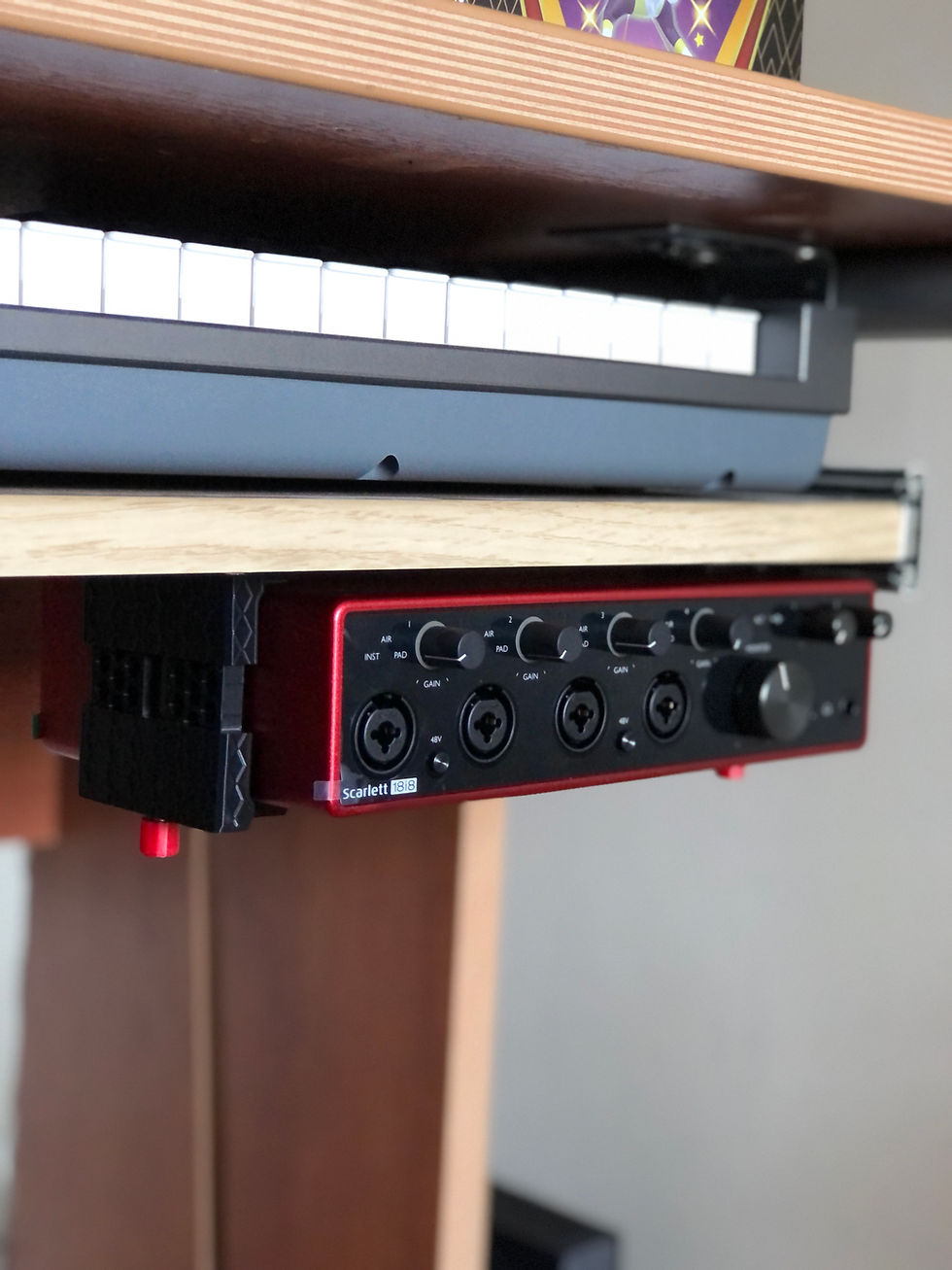
I found that mounting my Focusrite audio interface and other peripherals under the desk not only cleared my workspace but also gave me a more professional and streamlined setup. It’s a small change that makes a big difference.
How Audio Interface Desk Mounting Solutions Enhance Your Setup
Focusrite offers a range of mounting accessories designed specifically for its audio interfaces and equipment. These mounts are sturdy, easy to install, and tailored to fit perfectly.
Here’s what I love about these solutions:
Custom fit: Designed to hold Audio Interface interfaces securely.
Durable materials: Made from high-quality plastic.
Easy installation: Comes with all necessary screws and instructions.
Space-saving design: Keeps your gear tucked away but accessible.
For example, I use a Focusrite under-desk mount to attach my Scarlett 4i4 3rd Gen Audio Interface beneath my desk. This keeps it off the surface but still within arm’s reach when I need to adjust settings or connect cables.

Practical Tips for Setting Up Your Under-Desk Mount
Getting your Audio Interface mount installed correctly is key to maximising its benefits. Here’s a step-by-step guide based on my experience:
Choose the right location: Pick a spot under your desk that’s easy to reach but won’t interfere with your legs or chair movement.
Measure carefully: Ensure there’s enough clearance for cables and ventilation.
Gather tools: You’ll typically need a screwdriver, a drill (optional), and the mounting kit.
Mark drill points: Use the mount as a template to mark where screws will go.
Drill pilot holes: This prevents the wood from splitting.
Attach the mount: Secure it firmly with screws.
Mount your Focusrite device: Slide into place according to the product instructions.
Manage cables: Use cable ties or clips to keep everything neat.
By following these steps, you’ll have a secure, tidy setup that looks professional and functions smoothly.
Elevate Your Workspace with Smart Organisation
Optimising your workspace with Focusrite desk mounting solutions is more than just tidying up. It’s about creating an environment that supports your creativity and efficiency. When your gear is organised and accessible, you can focus on what really matters - making great music, streaming with confidence, or producing amazing content.
If you’re ready to transform your setup, consider adding an Audio Interface under-desk mount to your toolkit. It’s a simple upgrade that delivers.
With the right mounting solutions and a bit of organisation, your desk can become a powerhouse of creativity and productivity. Here’s to working smarter, not harder!


Comments